File & Data
How JSON Arrays and Nested Objects Convert to XML
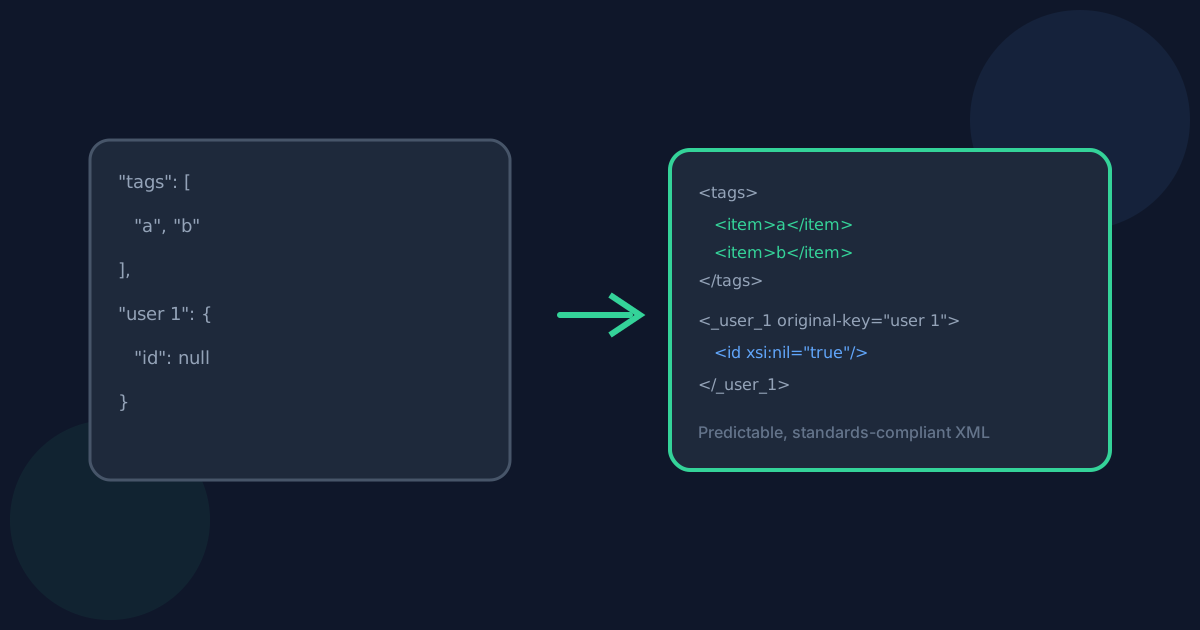
JSON and XML model structure differently, so a predictable, documented mapping matters more than a clever one. Looty Tools JSON to XML uses one rule per JSON type: objects become elements with named children, arrays become elements with repeated <item> children, and invalid key names are rewritten with the original preserved. This guide explains each rule with examples.
Ready to try the tool this guide describes?
Arrays become repeated <item> elements
Every JSON array—whether it holds strings, numbers, objects, or a mix—becomes an element containing one <item> child per entry, in the original order. This rule is applied the same way at every nesting level, including when the top-level JSON value is itself an array, so there is only one array rule to remember rather than a different one for top-level versus nested arrays.
| JSON | XML |
|---|---|
| {"tags":["a","b"]} | <tags><item>a</item><item>b</item></tags> |
| ["a","b"] | <root><item>a</item><item>b</item></root> |
Invalid key names are rewritten, not dropped
A JSON key with spaces, punctuation, a leading digit, or the reserved "xml" prefix is not a valid XML element name. Looty Tools JSON to XML replaces invalid characters with an underscore, adds a leading underscore when needed, and—whenever the name actually changes—keeps the original key in an original-key attribute so no information is lost.
- "first name" becomes <first_name original-key="first name">
- "1st-login" becomes <_1st-login original-key="1st-login">
- "xml:lang" becomes <_xml_lang original-key="xml:lang">
- Two different keys that sanitize to the same name are suffixed deterministically, such as field and field_2, so they are never mistaken for a repeated array element.
Null, numbers, and empty values
A JSON null becomes a self-closing element with xsi:nil="true", using the standard XML Schema Instance namespace, which is declared once on the root element only when at least one null is present. Numbers—including integers larger than Number.MAX_SAFE_INTEGER, decimals, and scientific notation—are copied through using their exact original text rather than being reformatted.
Empty objects, empty arrays, and empty strings all produce the same empty XML element. The tool does not add type attributes to distinguish them, so the original JSON type of an empty value is not recoverable from the XML alone.
Nested objects use one element per key
A nested JSON object becomes an element containing one child element per key, recursively. There are no dotted-path column names like in a spreadsheet conversion—each level of nesting is its own XML element, which keeps the document a direct structural mirror of the JSON.
JSON Arrays and Nested Objects to XML FAQ
- Why do arrays always use <item> instead of a name based on the key?
- Using <item> consistently at every nesting level—including for a top-level array with no key at all—means there is a single array rule to learn instead of one rule for nested arrays and a different one for top-level arrays.
- What does the original-key attribute mean?
- It appears only when a JSON key had to be rewritten to become a valid XML element name, and it holds the exact original key text so the rewritten name can be traced back to the source JSON.
- Why is there an xmlns:xsi attribute on the root element?
- It declares the standard XML Schema Instance namespace used by xsi:nil="true", which marks JSON null values. It is added only when the JSON contains at least one null.
- Can I tell an empty array apart from an empty object in the XML?
- Not from the XML alone. Empty objects, empty arrays, and empty strings all serialize to the same empty element in this version, which is documented rather than resolved with extra type attributes.
- Where should I go for the full JSON to XML conversion steps?
- See /guides/how-to-convert-json-to-xml for the full workflow and /guides/json-to-xml-without-uploading for privacy details.
Related guides
- How to Convert JSON to XMLConvert a .json file or pasted JSON into a formatted .xml document locally: choose a root element name, review the preview, and download without uploading.
- JSON to XML Without UploadingSee how browser-based JSON to XML conversion keeps JSON data on your device, what still leaves the machine, and how local conversion differs from upload services.
- Nested XML and Attributes to ColumnsSee how nested XML elements, attributes, mixed content, and repeated same-name children become stable spreadsheet column names when converting to Excel.


