File & Data
How Nested XML and Attributes Convert to Excel Columns
XML trees rarely match flat spreadsheets one-to-one. Looty Tools XML to Excel flattens each selected record into columns using stable path rules so nested data stays readable. This guide explains attributes, nesting, mixed content, namespaces, and indexed siblings.
Ready to try the tool this guide describes?
Attributes become @ columns
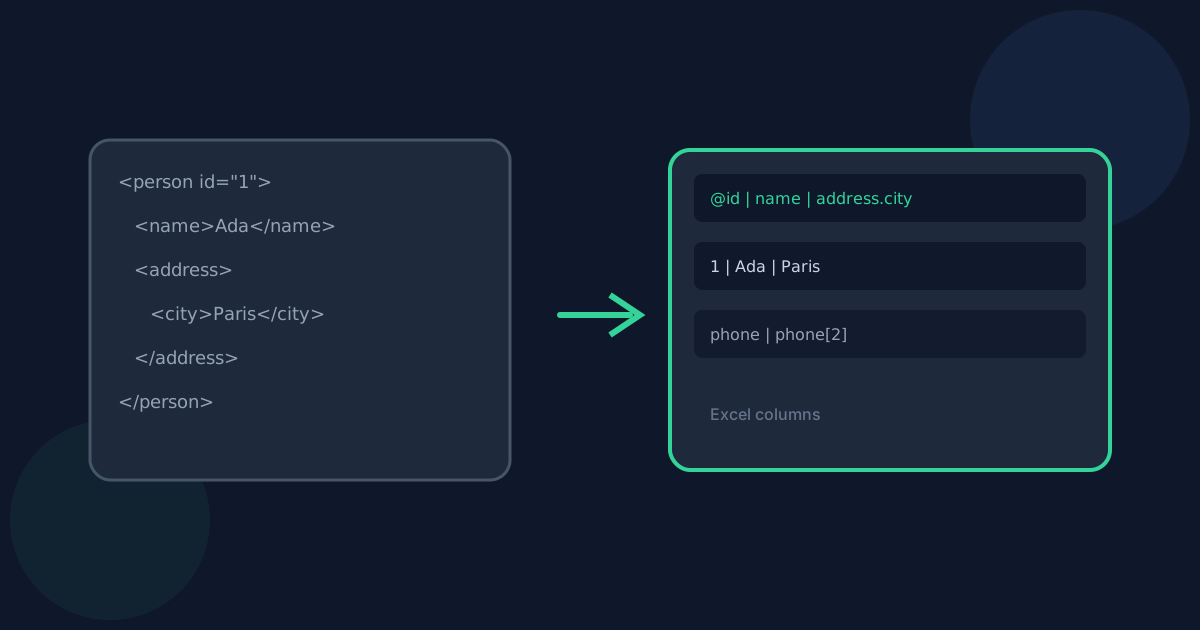
An attribute on a record or nested element becomes a column named with @, such as @id or address.@type. Attribute values are written as text cells.
Nested elements use dotted paths
Child elements become columns like name or address.city. Missing fields across rows stay blank so every row shares the same column set.
Repeated same-name children are indexed
If one record contains multiple phone elements, columns are named phone, phone[2], phone[3], and so on. The same indexing applies under nested paths, such as contact.phone[2].
Mixed content and namespaces
When an element has both direct text and child elements, direct non-whitespace text is stored in a #text column at that path, and children are flattened separately. Descendant text is not combined into one cell, which avoids duplicating child values.
Namespace identity uses namespace URI plus local name so unrelated namespaced siblings are not merged. User-facing paths prefer local names and add a prefix or short disambiguation only when needed.
Nested XML and Attributes to Columns FAQ
- Why do I see columns like address.city?
- Nested elements are flattened into dotted paths so each leaf value has a stable column name without collapsing the structure into a single cell.
- What does @id mean in the header row?
- Columns that start with @ come from XML attributes. @id is the id attribute on that record or nested element path.
- Why is there a #text column?
- Mixed-content elements keep their direct text in #text while child elements become their own columns. This prevents child text from being duplicated into the parent cell.
- How are repeated phone elements named?
- Same-name children under one record become phone, phone[2], phone[3], and so on, including under nested paths like contact.phone[2].
- Where should I go for the full XML to Excel steps?
- See /guides/how-to-convert-xml-to-excel for the full workflow and /guides/xml-to-excel-without-uploading for privacy details.
Related guides
- How to Convert XML to ExcelConvert XML with repeating records into an Excel .xlsx workbook locally: choose a record group, preview columns, and download without uploading.
- XML to Excel Without UploadingLearn how browser-based XML to Excel keeps document data on your device, what still leaves the machine, and how local conversion differs from upload services.
- Browser-Based File PrivacyUnderstand local browser processing, when files stay on your device, practical privacy checks, and how Looty Tools discloses different processing models.


