File & Data
How Nested XML Data Is Flattened Into CSV Columns
XML and CSV model structure very differently — XML nests freely, while CSV is a flat grid of rows and columns — so Looty Tools XML to CSV uses the same documented flattening rules as XML to Excel, applied consistently regardless of how deep or unusual the source XML is. This guide walks through each rule with examples.
Ready to try the tool this guide describes?
Attributes become @attribute columns
Every XML attribute on a record element becomes its own column, prefixed with @ so it is never confused with a child element of the same name.
| XML | CSV columns |
|---|---|
| <book id="1"><title>Alpha</title></book> | @id, title |
Nested elements use dotted column names
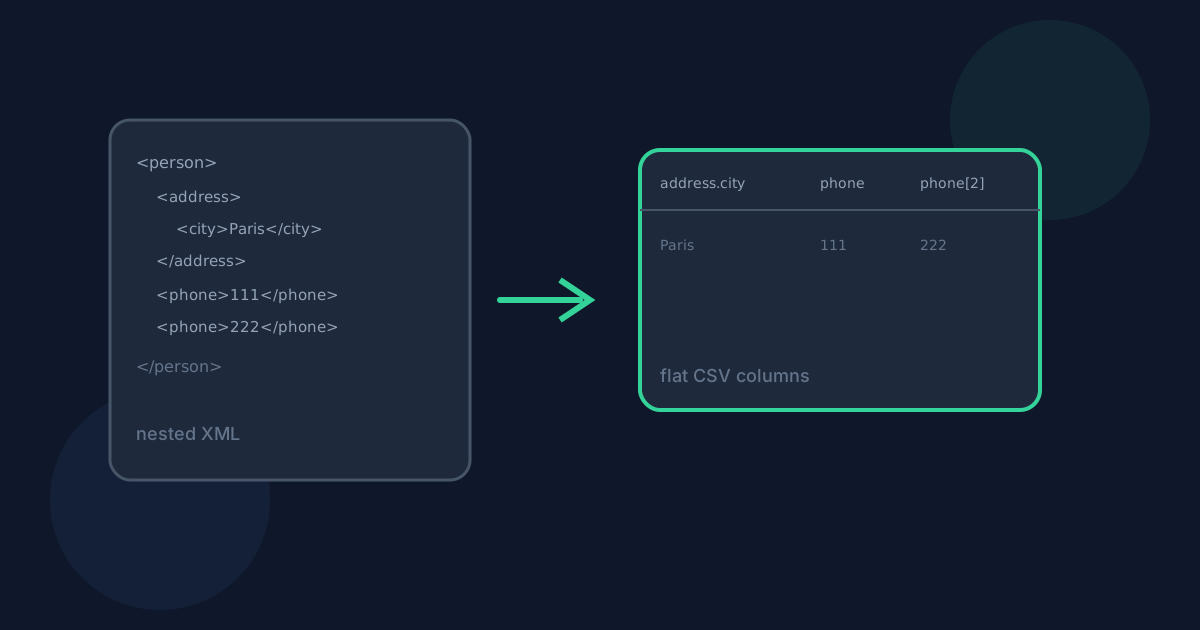
A nested child element flattens into a dotted path built from its ancestor chain, such as address.city or address.zip, rather than being dropped or merged into a single cell.
- <address><city>Paris</city></address> becomes column address.city
- Deeper nesting keeps extending the dotted path, up to the maximum flattening depth
Repeated child elements are indexed
When one record has more than one child element with the same name — repeated phone numbers, for example — the first occurrence keeps the plain name and later ones get a bracketed index: phone, phone[2], phone[3].
Mixed content, empty elements, CDATA, and comments
An element that mixes direct text with child elements keeps its own direct text in a #text column, separate from any child element columns, so neither is lost or merged. CDATA sections are treated as ordinary text. Comments and processing instructions are ignored entirely, since they carry no data value. An element with no content and no children still gets a column, with an empty CSV cell.
Namespaces, duplicate columns, and depth limits
Elements in different XML namespaces are never merged, even if they share a local name — a:item and b:item are treated as two distinct record groups. If two different source paths flatten to the same column name, the first value written wins; this is a documented, deliberate trade-off rather than an error. XML nested more than 50 levels deep is rejected with a clear error rather than silently truncated, to keep conversions predictable and fast.
Nested XML to CSV Columns FAQ
- Why do attribute columns start with @?
- The @ prefix keeps an attribute such as id visually distinct from a child element also named id on the same record, so the two are never confused in the CSV header row.
- What happens if two different elements flatten to the same column name?
- The first value written to that column wins for that record. This is a documented limitation rather than a bug — renaming the conflicting elements in the source XML is the only way to separate them into different columns.
- Can I choose which nested field becomes a row instead of a column?
- Row selection works at the record-group level, not per field: choose which repeated element becomes a row using the record group selector, and every attribute and nested field under that element becomes a column automatically.
- What happens to XML documents with multiple unrelated record collections?
- The record group selector lists every repeating group found anywhere in the document. Only one group becomes rows per conversion, so a document with, for example, both <books> and <authors> needs one conversion run per group.
- Where should I go for the full XML to CSV conversion steps?
- See /guides/how-to-convert-xml-to-csv for the full workflow and /guides/xml-to-csv-without-uploading for privacy details.
Related guides
- How to Convert XML to CSVConvert a .xml file or pasted XML into a downloadable CSV table locally: choose the repeating record group, review the preview, and download without uploading.
- XML to CSV Without UploadingSee how browser-based XML to CSV conversion keeps XML data on your device, what still leaves the machine, and how local conversion differs from upload services.
- Nested XML and Attributes to ColumnsSee how nested XML elements, attributes, mixed content, and repeated same-name children become stable spreadsheet column names when converting to Excel.


