File & Data
How CSV Headers and Data Types Affect JSON Output
A predictable, documented mapping from CSV rows to JSON matters more than a clever one, especially when headers are messy. Looty Tools CSV to JSON keeps every value as a string and applies deterministic rules for blank headers, duplicate headers, and rows that are shorter or longer than the header row. This guide explains each rule with examples.
Ready to try the tool this guide describes?
Every value stays a string
CSV to JSON never infers numbers, booleans, dates, or null from cell content. A value such as 00123 stays "00123", a large numeric identifier is copied through exactly with no precision loss, and text like true or FALSE stays a literal string rather than becoming a JSON boolean.
| CSV cell | JSON value |
|---|---|
| 00123 | "00123" |
| true | "true" |
| (empty cell) | "" |
Blank and duplicate headers get deterministic names
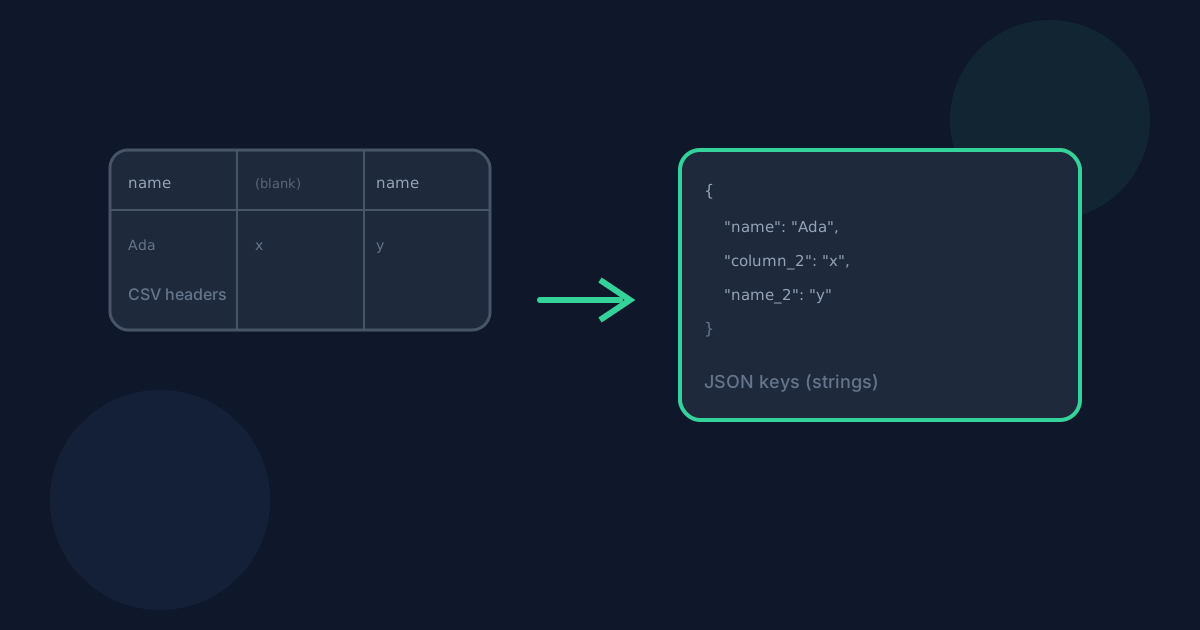
A blank header cell gets a positional fallback name such as column_2, based on its position in the row. Duplicate header names — including a real header that happens to collide with a generated fallback, such as a column literally named column_2 — are resolved with a single pass over the complete header list, so the real header keeps the bare name and the generated one is suffixed instead.
- name, name, name becomes name, name_2, name_3
- name, (blank), age becomes name, column_2, age
- name, (blank), column_2 becomes name, column_2, column_2_2
Short and long rows never lose data
A row with fewer values than the header row is padded with empty strings, so every JSON object has the same complete set of keys — no object is ever missing a key that others have. A row with more values than the header row gets additional positional keys, such as column_5, rather than having the extra values silently dropped.
Blank rows and the header-only case
A fully blank row in the middle of the file is preserved as an object whose values are all empty strings, rather than being silently skipped — except for one trailing blank line at the very end of the file, which is treated the same way spreadsheet software treats a final newline. A CSV with only a header row and no data rows is rejected when "First row contains headers" is enabled; turn the setting off to convert the single row as data instead.
CSV Headers and Data Types to JSON FAQ
- Why does 00123 not become the number 123?
- CSV to JSON never infers types from cell content, so leading zeros, large numeric identifiers, and boolean-looking text are preserved exactly as written rather than being reinterpreted.
- What happens with two columns that have the same header name?
- The first occurrence keeps the bare name and later occurrences get a numeric suffix, such as name, name_2, name_3, so no data is silently overwritten.
- What happens with a blank header cell?
- It gets a positional fallback name such as column_2, based on where it sits in the header row, and that name still goes through the same duplicate-resolution pass as every other header.
- Does a short row lose data compared to a long row?
- No. Short rows are padded with empty strings so every object has the same keys, and long rows get additional positional keys instead of having the extra values dropped.
- Where should I go for the full CSV to JSON conversion steps?
- See /guides/how-to-convert-csv-to-json for the full workflow and /guides/csv-to-json-without-uploading for privacy details.
Related guides
- How to Convert CSV to JSONConvert a .csv file or pasted CSV into formatted JSON locally: choose the delimiter and header handling, review the preview, and download without uploading.
- CSV to JSON Without UploadingSee how browser-based CSV to JSON conversion keeps CSV data on your device, what still leaves the machine, and how local conversion differs from upload services.
- Preserve Leading Zeros in CSV to ExcelKeep ZIP codes, account IDs, and other padded values intact when converting CSV to Excel by enabling preserve-as-text mode before download.


