Text & writing
Literal Find and Replace vs. Regular Expressions
Find and replace comes in two flavours. Literal search looks for exactly the characters you type. Regular expressions (regex) treat many of those characters as instructions. Mixing them up is the most common reason a replacement changes far more — or far less — than intended.
Ready to try the tool this guide describes?
What literal matching means
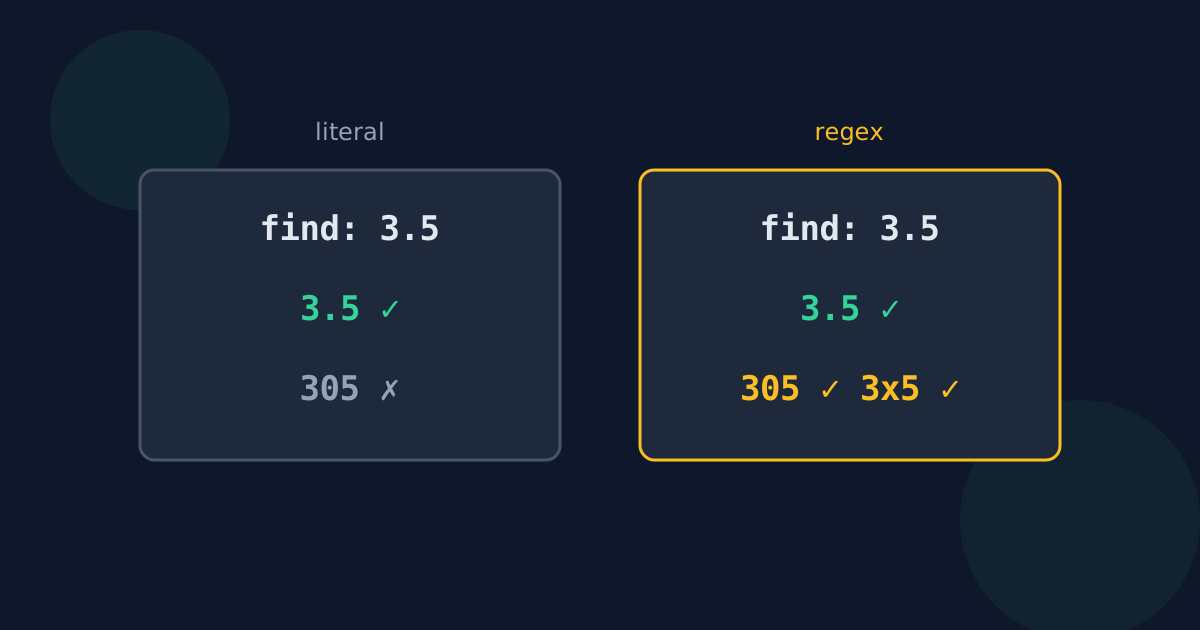
In literal mode, every character stands for itself. Searching for “3.5” finds only “3.5”; searching for “(draft)” finds only that bracketed word. It is predictable, needs no special knowledge, and is what most people expect from a basic find and replace.
Characters that change meaning in regex
So a regex search for “3.5” also matches “305” and “3x5”, and a search for “(draft)” matches the word “draft” with no brackets at all.
| Character | Literal meaning | Regex meaning |
|---|---|---|
| . | A full stop | Any single character |
| * | An asterisk | Repeat the previous item any number of times |
| ? | A question mark | The previous item is optional |
| [ ] | Square brackets | Any one of the characters inside |
| ( ) | Parentheses | Group part of the pattern |
| ^ and $ | Caret and dollar signs | Start and end of a line |
The replacement-text trap
In regex mode the replacement has codes of its own. In JavaScript and many editors, $& inserts the whole match and $1 inserts the first group; other programs use \1 instead. Typing a price such as “$10” as the replacement in regex mode can therefore produce something unexpected, because the program may read $1 as a reference to a group. Literal replacement inserts dollar signs and backslashes exactly as typed.
When regex is worth it
- Matching a pattern instead of fixed text: every date, phone number, or order code.
- Rearranging parts of each match, such as turning “Smith, Jane” into “Jane Smith”.
- Matching only at the start or end of lines.
For a fixed word or phrase — including prices, file names, and anything with punctuation — literal search is safer and needs no escaping.
Literal vs. Regex Replace FAQ
- What is the difference between literal and regex search?
- Literal search looks for exactly the characters you type. Regex treats characters such as . * ? ( and [ as pattern instructions.
- Why did my search for a full stop match every character?
- Regex mode was probably on. In regex, a full stop means “any character”; escape it as \. or switch to plain-text search.
- Why did $1 appear strangely in my replacement?
- In regex replacements, $1 means “the first captured group”. In literal mode it is inserted as the two characters $ and 1.
- Is regex faster than literal search?
- Not meaningfully for everyday text. Choose based on whether you need a pattern, not on speed.
- Does the Looty Tools Find and Replace support regex?
- No. It is deliberately literal, so symbols in both boxes always mean themselves.
Related guides
- Find and Replace MistakesCommon Replace All mistakes — matching inside longer words, losing capitals, swapping two words, repeated runs, and lookalike characters — and their fixes.
- Find and Replace in Word and DocsShortcuts, options, and special codes for find and replace in Word, Google Docs and Sheets, Excel, and VS Code, including line breaks and wildcards.
Open the tool
Jump into Find and Replace Text when you are ready to process your files.
