Text & writing
Why a Suffix Lands After Invisible Spaces
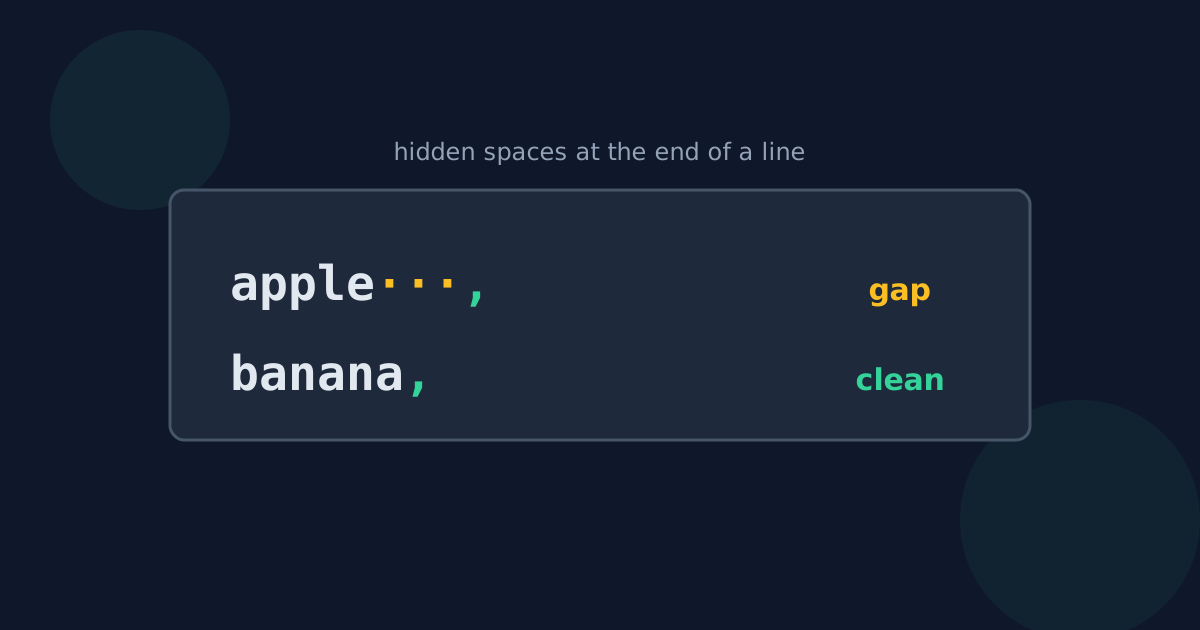
You add a comma to the end of every line and some lines come out as “apple ,” with a gap — or the comma seems to jump to the start of the line. The cause is almost always characters you cannot see at the end of those lines. Here is where they come from and how to get rid of them.
Ready to try the tool this guide describes?
Where trailing whitespace comes from
- Text copied from PDFs and web pages, where lines are padded with spaces.
- Fixed-width exports from older systems, which pad every value to the same length.
- Spreadsheet cells that contained a space after the value.
- Editing: deleting the end of a line but not the space before it.
How to see it
Most code editors can show whitespace as faint dots and arrows (in VS Code: View → Appearance → Render Whitespace). In any text box, click at the end of a line and press Shift+Home (Cmd+Shift+Left Arrow on a Mac): the highlighted area extends past the last visible character if spaces are there.
The suffix that appears at the start of the line
Windows ends each line with two invisible characters, a carriage return and a line feed. A tool that only splits text on the line feed leaves the carriage return at the end of each line, and the suffix is added after it. Some programs then display the suffix at the start of the line or overwrite the beginning of the text. A tool that recognises Windows line breaks, as Looty Tools does, puts the suffix before the whole line break instead.
Fixing it
- Trim spaces and tabs from the end of every line — Remove Extra Spaces does this and also collapses doubled spaces inside lines.
- Add the suffix to the cleaned lines.
- If the result will go back into a spreadsheet, also check for non-breaking spaces, which look like spaces but survive some trimming functions such as Excel’s TRIM.
Suffix After Invisible Spaces FAQ
- Why is there a space before my suffix?
- The line already ended with a space or tab. The suffix is added after it. Trim trailing spaces first.
- Why does my comma appear at the start of the line?
- The line probably ends with a hidden carriage return from a Windows line break, and the tool added the comma after it.
- How can I see trailing spaces?
- Turn on “render whitespace” in a code editor, or select from the end of the line backwards to highlight them.
- Does Excel’s TRIM remove non-breaking spaces?
- No. TRIM removes ordinary spaces only; use SUBSTITUTE(A2, CHAR(160), " ") first to convert non-breaking spaces.
- Should I trim before or after adding a suffix?
- Before. Trimming afterwards would not remove spaces that now sit in front of the suffix.
Related guides
- Add Commas to Each LineTurn a column of values into a comma-separated list for SQL, code, or data files — and handle the last comma, quotes, and blank lines correctly.
- Spaces, Tabs, and Non-Breaking SpacesThe different space characters — ordinary spaces, tabs, non-breaking, narrow, em and zero-width spaces — with their code points and how each behaves.
Open the tool
Jump into Add Suffix to Each Line when you are ready to process your files.
