PDF guides
PDF Redaction vs Blacking Out Text
A black rectangle drawn on top of PDF text is a common but risky way to "redact" a document. This guide explains why that is not the same as real redaction.
Ready to try the tool this guide describes?
The problem with a drawn-on black box
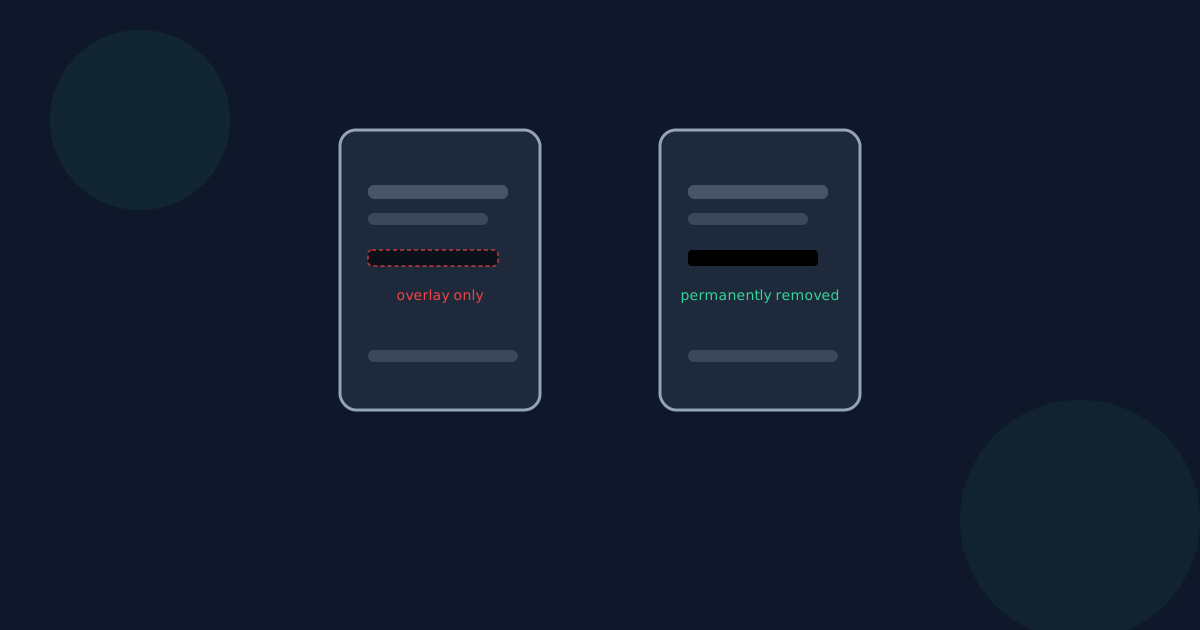
Many PDF tools let you draw a black shape over text and call it redaction. Because the shape is just another object placed on top of the page, the original text usually remains in the page's content stream underneath it — selectable, searchable, and recoverable by removing or moving the shape, or by extracting the page's text directly.
What real redaction requires
Genuine redaction means the sensitive content is not present in the output file at all, not just visually covered. Redact PDF achieves this by rebuilding each redacted page as a flattened image — the original text and image data for that page is never copied into the output.
This is why redacted pages lose selectable text and any page-level annotations: the whole page becomes a single image.
How to check a redaction actually worked
After redacting, try selecting, copying, and searching for the hidden text in the downloaded file using a different PDF viewer than the one you used to redact it. If the text cannot be selected, copied, or found by search, the content is genuinely gone.
Redaction vs Blacking Out FAQ
- Is drawing a shape over text in a PDF editor the same as redacting it?
- No. Unless the tool explicitly rebuilds the page without the original content, the text is usually still present underneath the shape.
- How can I verify a PDF was really redacted?
- Open the output in an independent PDF viewer and try to select, copy, or search for the redacted text or content — it should not be findable.
- Does Redact PDF use the flatten-to-image approach?
- Yes. Pages with a redaction box are rebuilt as an image, which is what makes the underlying text and pixels genuinely unrecoverable.
- Are there downsides to flattening a page to an image?
- Yes — the page loses selectable/searchable text and any links, form fields, or annotations on that page. Redact PDF only flattens pages you actually mark for redaction.
- Does removing the black box in a PDF editor expose the original content?
- With a simple overlay-based "redaction," often yes. With Redact PDF's flattened output, there is no original content left to expose.
Related guides
- How to Redact a PDFDraw boxes over sensitive text or images in your browser and download a PDF where that content has been genuinely removed, not just covered up.
- Remove Sensitive PDF InfoA practical checklist for removing sensitive text, images, and metadata from a PDF before sharing it, and which steps a redaction tool does and does not cover.
- AES-256 PDF Encryption ExplainedUnderstand what AES-256 encryption means for a password-protected PDF, how it compares to older methods, and why a lost password cannot be recovered.


